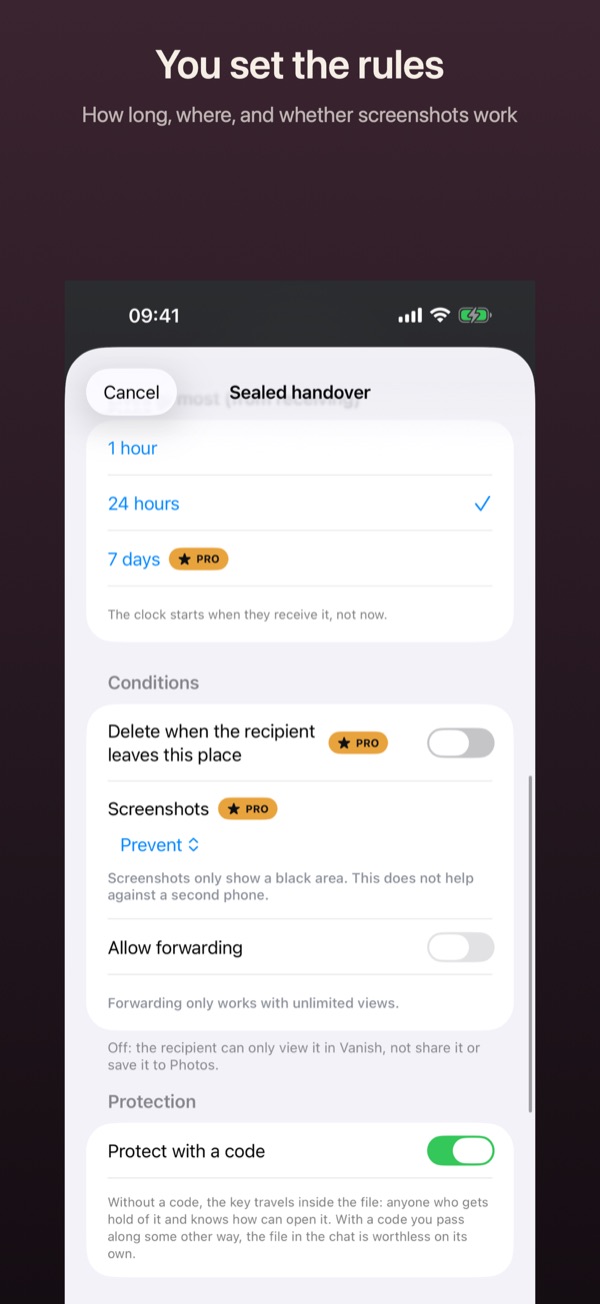
Prevent screenshots of a handover
When you seal a handover, you can decide what happens on a screenshot. Here is what that does and where the limit is.
How it works
- While sealing, open the Conditions section.
- Under Screenshots, pick a setting: Allowed, Prevent or Prevent and delete.
- With Prevent, screenshots and screen recordings on the recipient’s side only show a black area.
- With Prevent and delete, Vanish also deletes the handover as soon as iOS reports a screenshot.
- Tap Create file as usual.
Good to know
- Screenshot protection is Pro. The recipient doesn’t need Pro for it.
- iOS has no official feature for this. If Vanish can’t prevent screenshots on a device, it tells the recipient, and a screenshot then deletes the handover.
- No app can stop a second phone from photographing the screen.
- While a screen recording is running, Vanish hides received content.