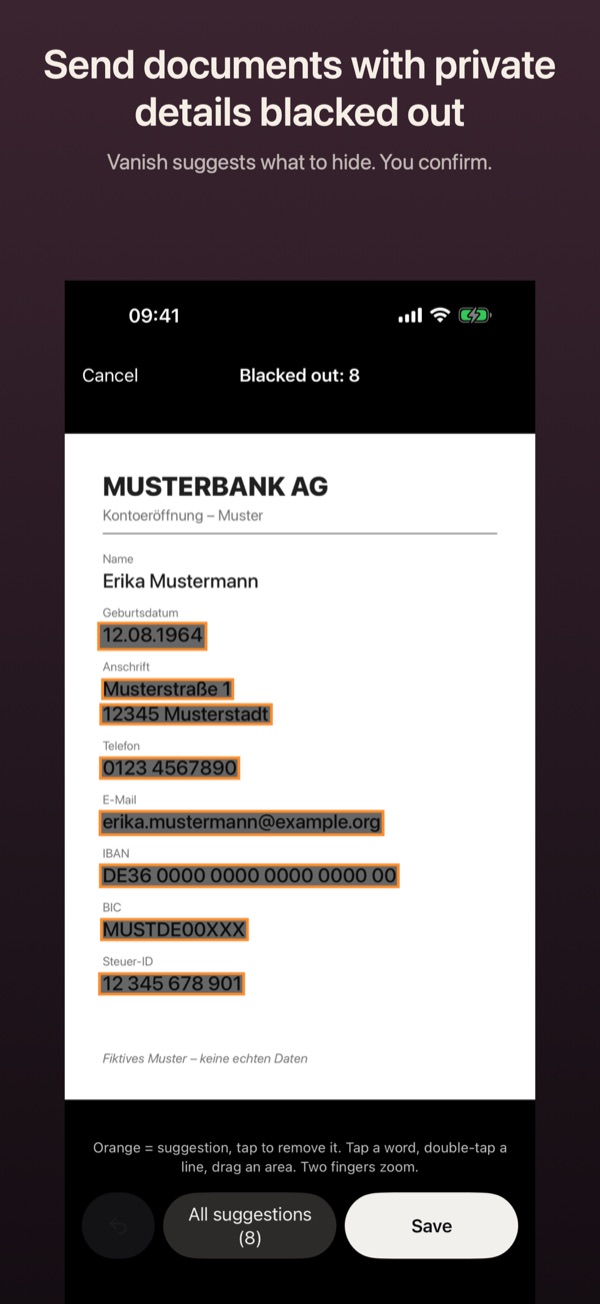
Black out an IBAN or address in a document
Before a statement or contract goes out, not everything on it should be readable. Vanish finds IBANs, tax IDs, addresses and more, and burns the bars in for good.
How it works
- Open the vault, tap the photo or PDF, then “…” at the top right and Black out.
- Vanish reads the text on your device and marks suggestions in orange, such as an IBAN, tax ID, phone number, address or ID number.
- Tap a suggestion to remove it. Black out your own spots by tapping a word, double-tapping a line or dragging over an area.
- Undo takes back the last bar, and All suggestions accepts every orange spot.
- Tap Save and choose Save as new version. The original then stays in the vault.
Good to know
- Blacking out is free and works on photos and PDFs.
- The bars are rendered into the image or page. No selectable text remains underneath.
- The suggestions are a help, not a guarantee. Look at the result before sending.
- Replace original deletes the unredacted version. This can’t be undone.